
Bridging Worlds: Making .NET BFF and React/Vite Play Nice in Development
When you’re building modern web applications, you’ll often find yourself caught between two worlds — the robust, enterprise-grade backend of .NET and the lightning-fast, developer-friendly frontend tooling of React and Vite. It’s a bit like trying to conduct a symphony where half the orchestra speaks Italian and the other half speaks Mandarin.
As Anthony Bourdain once said, “The way you make an omelet reveals your character.” How you set up your development environment reveals everything about your approach to software craftsmanship — do you accept friction as inevitable, or do you engineer elegance? When we take the time to thoughtfully integrate our technologies rather than just forcing them to coexist, we create something far more powerful than the sum of its parts.

The Challenge We Face
We’ve all been there. You’re working on a project where you need the best of both worlds: .NET’s mature ecosystem and excellent tooling for your backend API, paired with React’s component-driven architecture and Vite’s blazing-fast hot module replacement. The problem? These technologies speak different languages and live on different ports.
The traditional approach often forces you into an awkward dance — build your frontend, copy assets, restart your backend, and pray everything works. Even worse, you’re likely battling CORS issues because your browser is trying to talk to multiple ports simultaneously. Your frontend on localhost:3000 wants to talk to your backend on localhost:5000, and your browser’s security model is having none of it. It’s about as efficient as trying to debug a race condition with console.log statements. Sure, it might work eventually, but you'll lose your sanity in the process.
A Better Way Forward
Let’s walk through a solution that respects both technologies while giving you the development experience you deserve. We’ll set up a .NET Backend for Frontend (BFF) running on port 5000, with a React application built with Vite running on port 3000.
The Foundation: Port Configuration
First, we need to establish our territories. Your Vite dev server becomes the primary entry point on port 3000, while your .NET server handles API requests on port 5000. This isn’t just arbitrary — it’s strategic. By making Vite your primary entry point, you maintain access to all its development goodies: hot module replacement, instant updates, and that satisfying feeling when changes appear immediately in your browser.
The Bridge: Vite Proxy Configuration
Here’s where the magic happens. Configure your Vite server to proxy API calls to your .NET backend:
javascript config for vite
server: { port: 3000, host: 'localhost', strictPort: true, proxy: { // Routes matching pattern like /en-us/api/* go to .NET server '^/[a-z]{2}-[a-z]{2}/api/.*': { target: 'http://localhost:5000', changeOrigin: true, secure: false } } }This proxy configuration is your translator — it takes API calls from your React app and seamlessly forwards them to your .NET backend. Your frontend doesn’t know or care that it’s talking to a different server; it just knows its requests are being handled. Better yet, since everything appears to come from the same origin (localhost:3000), you’ve completely sidestepped CORS issues that would otherwise plague your development environment.
Beyond .NET: A Universal Pattern
While we’re focusing on .NET here, this pattern isn’t tied to any specific backend technology. Whether you’re running a Kotlin Spring Boot application, a Scala Play framework, Node.js with Express, or even a Python Django backend, the same principle applies. The key is having your frontend development server act as a reverse proxy to your backend.
The Razor View Conundrum
Now comes the interesting part. In production, your build process generates an asset manifest that your Razor views consume to output the correct script tags. But during development, you want to skip builds entirely to leverage Vite’s hot module replacement.
As Steve Jobs once said, “Simplicity is the ultimate sophistication.” Your development setup should feel effortless and intuitive, even though the underlying implementation might be quite sophisticated.
Here’s how we handle this elegantly in your Razor views:
csharp
@{ var isDevelopmentMode = Env.IsDevelopment(); } @if (isDevelopmentMode) { // Vite development setup with HMR support <script type="module"> import RefreshRuntime from '/@@react-refresh' RefreshRuntime.injectIntoGlobalHook(window) window.$RefreshReg$ = () => {} window.$RefreshSig$ = () => (type) => type window.vite_plugin_react_preamble_installed = true </script> <script type="module" src="/@@vite/client"></script> <script type="module" src="/src/app.tsx"></script> } else { // Production bundles referenced here }This is copied from the vite outputed index html, plus we had to add the extra bit for the react refresh to get it working.
The Workflow That Works
When you have everything configured correctly, your development workflow becomes surprisingly pleasant:
Start both servers — your .NET application on port 5000 and Vite on port 3000Access your application through Vite at localhost:3000Make changes to your React components and watch them update instantlySet breakpoints in both your C# backend code and your TypeScript frontend codeDebug seamlessly across both applications as if they were one
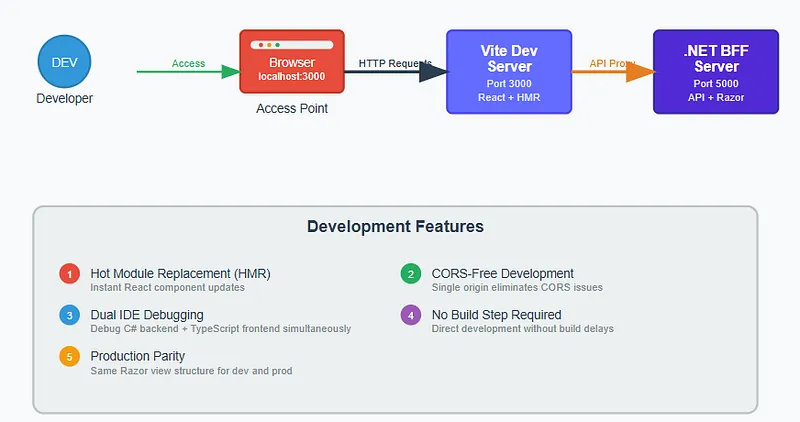
You get the robust debugging capabilities of Visual Studio or Rider for your backend, combined with the excellent developer tools in your browser for frontend work. It’s like having the best of both worlds without the usual compromises.
Why This Matters: The Business Case for Better Developer Experience
This setup isn’t just about convenience — it’s about velocity, quality, and ultimately, business value. When you remove friction from your development process, something remarkable happens: your team moves faster, finds bugs earlier, and ships better software.
Consider the compound effects. A developer who can see changes instantly doesn’t just save a few seconds per iteration — they maintain their flow state, the mental model of their changes stays fresh, and they’re more likely to catch edge cases in real-time, less like to context switc from waiting for a build. When debugging spans both frontend and backend seamlessly, you reduce the cognitive overhead of context switching between different tools and environments.
The Bigger Picture
What we’ve built here is more than just a development setup — it’s a bridge between different technological paradigms. We’ve proven that you don’t have to choose between .NET’s enterprise capabilities and modern frontend tooling. You can have both, and you can have them working together seamlessly.
The next time someone tells you that mixing server-side rendering with modern JavaScript frameworks is complicated, you can show them that with the right approach, complexity becomes elegance. After all, the best solutions often look simple from the outside, even when they’re sophisticated under the hood.
We’ve shown that bridging different technological paradigms doesn’t have to be painful. Whether you’re working with .NET, Kotlin, Scala, or any other backend technology, the principles remain the same: eliminate friction, embrace simplicity, and prioritize the developer experience that enables your team to do their best work.
What’s your team’s development setup costing you in lost productivity? How many good ideas never make it to production because the feedback loop is too slow? And perhaps most importantly — when was the last time your development environment made you smile instead of sigh?